NASA already has next Artemis flight in its sights following astronauts’ triumphant moon flybyApril 17, 2026
Illegal aliens are getting taxpayer-funded boob jobs and sex change ops in Newsom’s California, watchdog saysApril 17, 2026
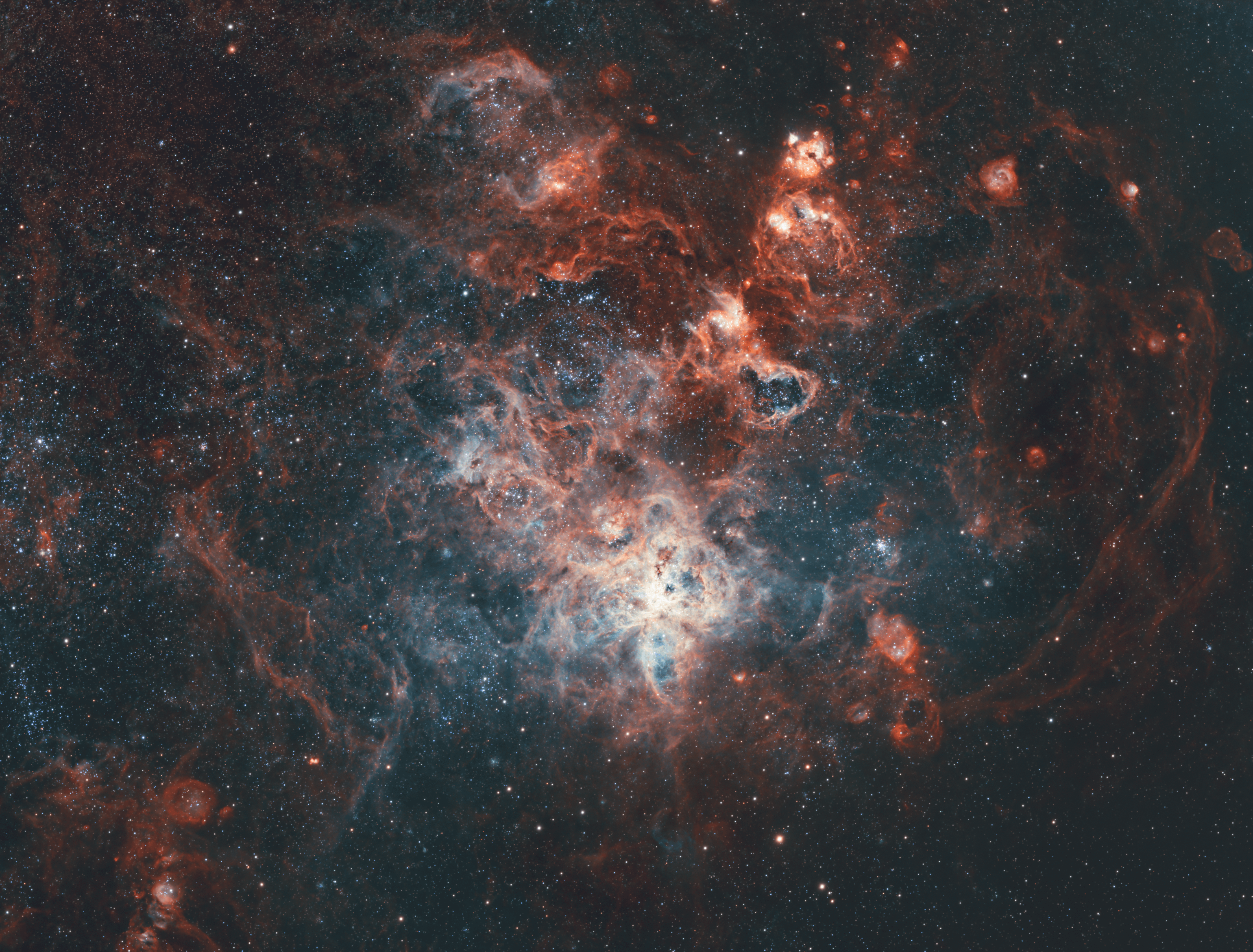
StruggleUnited9841 on October 11, 2025 12:49 pm NGC2070 – The Tarantula Nebula. Telescope: William Optics ZenithStar 61 / ZS61 Camera: ZWO ASI1600MM Pro Mount: Sky-Watcher EQ6-R Pro Filter: ZWO Red, ZWO Green, ZWO Blue, ZWO Sii 7nm, ZWO Ha 7nm, ZWO Oiii 7nm Accessories: PrimaLuceLab EAGLE5S, PrimaLuceLab ECCO 2, ZWO EAF Software: PixInsight Stefan Berg Nighttime Imaging ‘N’ Astronomy (N.I.N.A. / NINA) Guiding equipment: ZWO 30mm Mini Guider Scope, ZWO ASI120MM-S Image details: 60 x 30 sec each for RGB stars (30 minute per filter), 50 x 240 sec each for Sii, Ha and Oiii (3 h 20 minutes per filter) Processing Details (All in Pixinsight) 1. Stacked with WBPP Narrowband (each filter) 2. Remove gradient with GraXpert 3. Deconvolution with BlurXterminator 4. Remove stars with StarXterminator 5. Noise reduction with NoiseXterminator 6. Linear fit Sii and Oiii to Ha. Narrowband image processing 7. Create HOO 8. Use Narrowband Normalisation script to bring out Oiii colours. 9. Stretch HOO using Statistical Stretch 10. Stretch Sii using Statistical Stretch 11. Colourise Sii to yellow using NB Colour Mapper script. 12. Adjust Sii_Colourised with curves to darken background and boost highlights. 13. Blend HOO image with Sii_Colourised image using Image Blend script. 14. Adjust curves and saturation using Curves Transformation to get final colour image. Star Processing 15. Create RGB image using Channel Combination 16. Platesolve using image solver. 17. Set star colours using Spectrographic Colour Calibration 18. Deconvolution with BlurXterminator 19. Remove stars with StarXterminator 20. Stretch stars only image with Star Stretch script Final image 21. Combine final colour image with RBG stars image using Image Blend script. 22. Final noise reduction with NoiseXterminator.

1 Comment
NGC2070 – The Tarantula Nebula.
Telescope: William Optics ZenithStar 61 / ZS61
Camera: ZWO ASI1600MM Pro
Mount: Sky-Watcher EQ6-R Pro
Filter: ZWO Red, ZWO Green, ZWO Blue, ZWO Sii 7nm, ZWO Ha 7nm, ZWO Oiii 7nm
Accessories: PrimaLuceLab EAGLE5S, PrimaLuceLab ECCO 2, ZWO EAF
Software: PixInsight Stefan Berg Nighttime Imaging ‘N’ Astronomy (N.I.N.A. / NINA)
Guiding equipment: ZWO 30mm Mini Guider Scope, ZWO ASI120MM-S
Image details: 60 x 30 sec each for RGB stars (30 minute per filter), 50 x 240 sec each for Sii, Ha and Oiii (3 h 20 minutes per filter)
Processing Details (All in Pixinsight)
1. Stacked with WBPP
Narrowband (each filter)
2. Remove gradient with GraXpert
3. Deconvolution with BlurXterminator
4. Remove stars with StarXterminator
5. Noise reduction with NoiseXterminator
6. Linear fit Sii and Oiii to Ha.
Narrowband image processing
7. Create HOO
8. Use Narrowband Normalisation script to bring out Oiii colours.
9. Stretch HOO using Statistical Stretch
10. Stretch Sii using Statistical Stretch
11. Colourise Sii to yellow using NB Colour Mapper script.
12. Adjust Sii_Colourised with curves to darken background and boost highlights.
13. Blend HOO image with Sii_Colourised image using Image Blend script.
14. Adjust curves and saturation using Curves Transformation to get final colour image.
Star Processing
15. Create RGB image using Channel Combination
16. Platesolve using image solver.
17. Set star colours using Spectrographic Colour Calibration
18. Deconvolution with BlurXterminator
19. Remove stars with StarXterminator
20. Stretch stars only image with Star Stretch script
Final image
21. Combine final colour image with RBG stars image using Image Blend script.
22. Final noise reduction with NoiseXterminator.